A bigger screen changes how you use your iPhone.
The right storage depends on what you keep on it.
According to apple.com, preorders open on October 16, 2026, at 5 a.m. Pacific Time, with availability beginning October 23.
But who should buy it? And with storage options ranging from 256GB to 2TB, how much space is worth paying for?
AppleBlog’s recommendation is 512GB for most buyers, or 1TB if you frequently shoot video. Here is how the features, prices, and storage options compare.
Product information checked on September 9, 2026. This guide is based on Apple’s published specifications, not a hands-on review.
Foldable Display
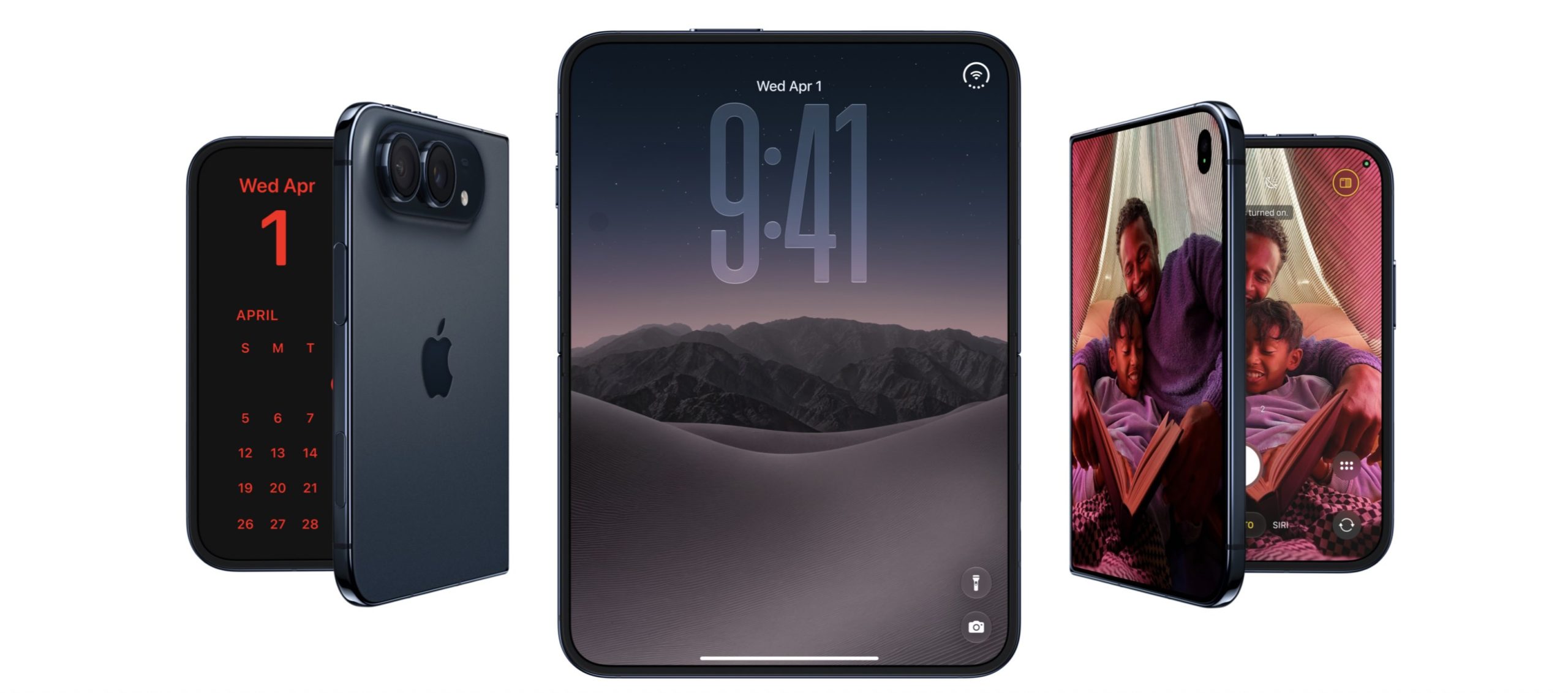
A 7.6-inch inner screen gives you more room for apps, entertainment, and everyday tasks.
From $1,999
The US lineup starts with 256GB and extends to a 2TB model priced at $3,199.
Our Pick: 512GB
A balanced option for photos, apps, travel downloads, and occasional video recording.
What Makes the iPhone Duo Different?
The main attraction is the space you gain when you open it.
Apple lists a 7.6-inch folding inner display and a 5.4-inch outer display. Both support ProMotion refresh rates up to 120Hz.
The outer screen handles quick interactions. Open the phone, and you have more room to read, view photos, and work with content.
With Split View in iOS 27, you can use two apps beside each other. The folding design also supports hands-free viewing and FaceTime calls, with the phone positioned at an adjustable angle.
For a blogger, that could mean keeping reference material beside a draft. For a traveler, it could mean checking booking details while messaging someone about arrival plans.
iPhone Duo Camera Specifications
- Main: 48MP, 26mm, f/1.6, sensor-shift stabilization; 12MP 2x optical-quality crop.
- Ultra Wide: 48MP, 13mm, f/2.2, 120° view; 48MP macro.
- Outer selfie camera: 12MP, f/2.2, Center Stage, 4K60 Dolby Vision.
- Inner camera: under-display, f/1.8, Center Stage, 1080p60.
- Video: Main-camera 4K120 Dolby Vision; Cinematic 4K60; Action 2.8K60; Dual Capture 4K30; Audio Mix.
The 2x option uses the Main camera rather than a separate telephoto lens. For a blogger, macro could help with close-up product details, while the outer camera offers the higher listed video resolution for self-recording.
Display, Design and Performance
- Screens: inner 1878 × 2670; outer 1398 × 2034; Always-On; 3000-nit outdoor peak; inner nano-texture.
- A20 Pro: 6-core CPU, 7-core GPU, dual 16-core Neural Engine.
- Body: titanium; 254g; 5.2mm open, 11.3mm closed; IP68.
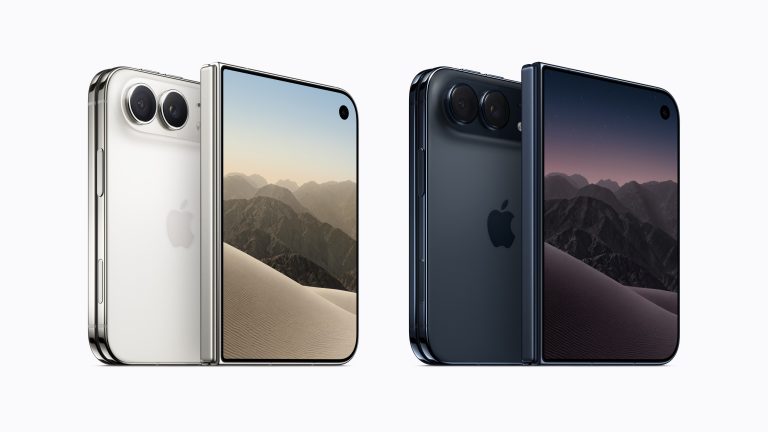
- Colors: Night Sky, Star White.
Battery, Charging and Connectivity
- Video playback: up to 31 hours on the inner display, 44 on the outer display.
- Charging: up to 50% in approximately 20 minutes with a 60W-capable adapter; MagSafe/Qi2 up to 25W.
- Connections: USB 3 up to 10Gb/s, DisplayPort, Wi-Fi 7, Bluetooth 6, 5G, dual eSIM.
- Other features: Touch ID, satellite SOS, Crash Detection, iOS 27, Apple Intelligence.
- Box: iPhone and USB-C cable; adapter separate.
Battery and charging figures are Apple’s claims. Actual results vary. Satellite and AI feature availability depends on region and other requirements.
iPhone Duo Price in the USA
Apple’s US store lists four storage configurations:
iPhone Duo US listed prices, checked September 9, 2026
| Storage |
US Price |
Extra vs. 256GB |
| 256GB |
$1,999 |
— |
| 512GB |
$2,199 |
$200 |
| 1TB |
$2,599 |
$600 |
| 2TB |
$3,199 |
$1,200 |
Source: Apple US Store. Check the final checkout total for applicable taxes and selected extras.
The move from 256GB to 512GB costs $200. Moving from 512GB to 1TB adds $400, while upgrading from 1TB to 2TB adds another $600.
That makes your actual storage habits more useful than simply choosing the largest option.
Who Should Buy Apple’s Foldable iPhone?
People Who Regularly Work from Their Phone
If you spend time reading documents, checking reference material, and writing messages, the larger workspace could make those tasks more comfortable.
The strongest reason to buy the Duo is having a regular use for its opened display.
Travelers and Entertainment Fans
A larger viewing area may appeal to people who watch shows, read, or browse photos while away from home.
Consider how often you would use that extra space before deciding whether the purchase price fits your needs.
Parents and Everyday Creators
The preview and hands-free camera features may make family photos and solo recording easier to arrange.
For creators, storage becomes especially relevant when video footage starts accumulating between transfers.
Who Should Think Twice?
If your phone use mostly consists of calls, messaging, and occasional browsing, it may be difficult to justify this much spending.
We would also suggest checking how the folded phone feels in your hand before committing if weight and thickness matter to you.
Which iPhone Duo Storage Should You Choose?
256GB: Best for Light Storage Needs
Choose 256GB if you mostly stream entertainment, keep a modest app collection, and regularly transfer photos and videos elsewhere.
As an editorial guideline, if your current phone uses comfortably under 128GB and that usage grows slowly, 256GB is a reasonable starting point.
It becomes less appealing if you already spend time deleting files to make space.
512GB: The Best Balance for Most Buyers
512GB is AppleBlog’s default recommendation.
It suits buyers who take plenty of photos, record occasional video, download entertainment for trips, and want room for their library to grow.
For someone writing blog posts, taking product photos, and recording occasional clips, this is where we would start.
The $200 upgrade is easier to justify when it helps avoid frequent storage cleanup.
1TB: Best for Frequent Video Creators
Choose 1TB if video recording is a regular part of your routine or you keep substantial media libraries offline.
If your current phone already contains several hundred gigabytes of content, this tier deserves serious consideration.
For bloggers producing frequent video coverage, 1TB offers more room between opportunities to transfer footage.
2TB: Best for a Large Local Library
Choose 2TB when you can identify the content that will fill it: extensive video footage, large offline collections, or ongoing projects you need to carry with you.
We would not pay for 2TB simply for reassurance. If your expected usage fits comfortably within 1TB, the extra $600 is difficult to justify.
Everyday Use
512GB: our preferred balance for photos, apps, downloads, and occasional video.
Frequent Video
1TB: consider this if your footage and offline libraries already occupy substantial space.
Large Archives
2TB: worthwhile when you have a clear requirement for extensive local storage.
How to Decide Before You Buy
Start with your existing storage use, then account for how your habits may change.
- Check how much space your current phone uses.
- Consider how quickly your photo and video library grows.
- Decide how much content you need available offline.
- Be realistic about how often you will transfer or delete files.
- Choose enough capacity to leave room for future growth.
Buy a capacity that comfortably supports your habits rather than one that barely fits your files today.
AppleBlog’s Recommendation
Choose the 512GB iPhone Duo if you want a balanced everyday configuration. It provides useful breathing room without moving into the more expensive storage tiers.
Choose 1TB if you frequently record video or already carry a large library. Pick 256GB if your needs are consistently light, and reserve 2TB for a measurable requirement.
The more important decision comes first: will you regularly use the folding display? If the answer is yes, choose storage around what you actually create and keep.
FAQ
What is Apple’s foldable iPhone called?
Apple calls its first foldable iPhone the iPhone Duo.
How much does the iPhone Duo cost in the US?
Apple lists the 256GB model at $1,999, 512GB at $2,199, 1TB at $2,599, and 2TB at $3,199.
When can I preorder the iPhone Duo?
Apple lists preorders beginning October 16, 2026, at 5 a.m. Pacific Time, with availability starting October 23.
Is 256GB enough?
It can be enough if your local storage needs are light, you mostly stream content, and you regularly transfer photos and videos. Compare your current usage with the room you expect to need over time.
Which storage option does AppleBlog recommend?
We recommend 512GB for most buyers. Consider 1TB if you frequently record video or keep large libraries offline.
Is the 2TB model worth it?
It is worth considering when you need extensive local storage for footage or offline collections. Otherwise, a smaller capacity is likely to offer better value for your needs.


0 Comments
Share your thoughts with other AppleBlog readers.