Beginning users iPhone and iPad are often confronted with difficulties in the process of iPhone and iOS firmware upgrade to the latest version. This is especially true for owners of jailbroken iPhone, firmware update that can sometimes cause iTunes error. In this manual, we will introduce you, dear readers, that is the iPhone DFU mode, for what it is, how to enter DFU mode, and what to do if the iPhone “stuck” in this mode and will not load.
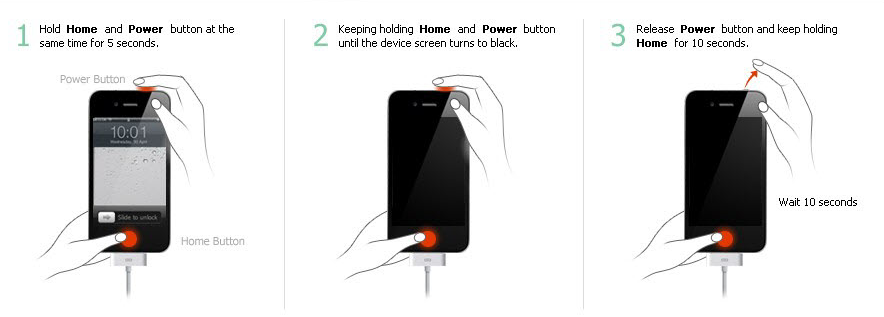
What is DFU mode iPhone 7, iPhone 6S, iPhone 6, iPhone 5S, iPhone 5?
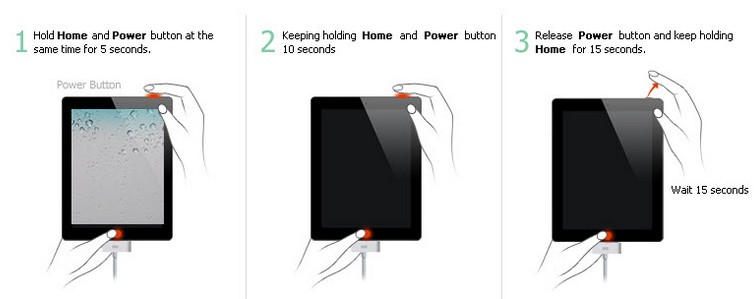
What is DFU mode iPad Pro, iPad Air 2, iPad Air, iPad, iPad Mini?
DFU-mode (Device Firmware Update) – this is the mode of updating the device firmware. It refers to the emergency operation and is recognized iTunes when you connect your iPhone or iPad to your computer using the USB-cable as a recovery mode. DFU Mode differs from the Recovery Mode in that in this mode, the device does not deliver any visible signs of life (no work control button, there is no picture on the display).
0 Comments
Share your thoughts with other AppleBlog readers.