As everyone knows, Apple is very concerned about user security, especially in the iOS mobile system for iPhone and iPad. But the company does not stop there, it also decided to protect users of the desktop system on their Mac computers. Starting with macOS Sierra, the operating system has a ban on installing applications from any source. now you can only download programs from the official Mac App Store or install them from installed developers who are registered with Apple.
This is also the case when you want to install a new, but not yet fully developed, version of the new macOS Big Sur 11.0. With the release of the beta version, macOS 11.0 updates can only be performed by those who have a special macOS Big Sur Beta Profile (developer account). If you are a developer, I’m sure you know how to get a developer profile. This post is for those who do not want to buy the opportunity to develop and sell their apps in the store, but want to install a new macOS Big Sur 11. Here you can find macOS Big Sur Beta Profile download links for free
How To Download macOS Big Sur Beta Profile for free:
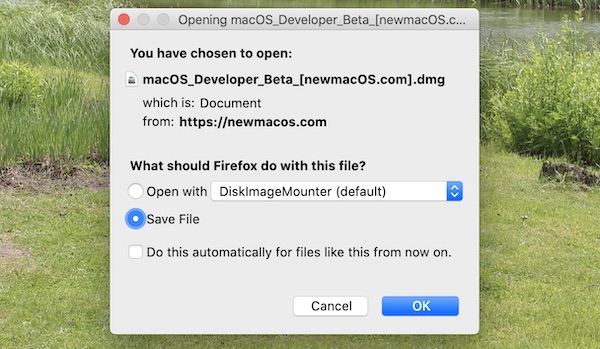
Step 1: Download macOS Big Sur Beta Developer Profile (link)
( password: IEGkwjVFJHMFyA4rqWxkLlcME6BNMtNFxCLCj_9KcGU )
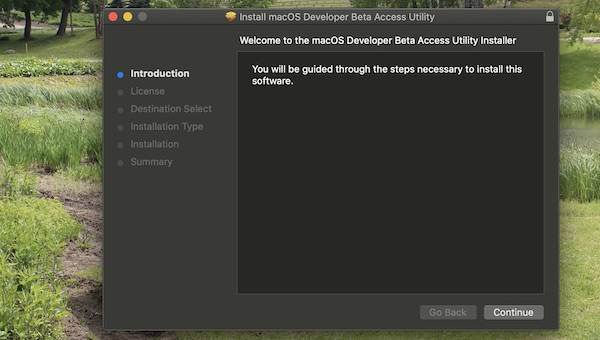
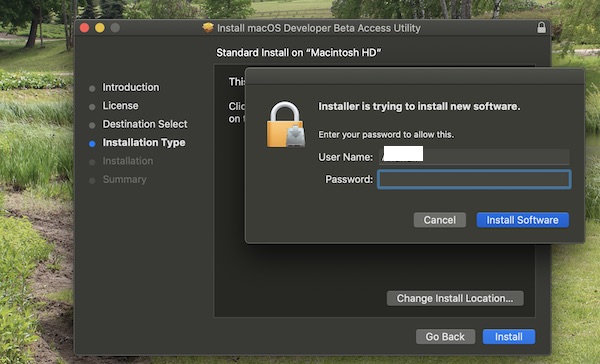
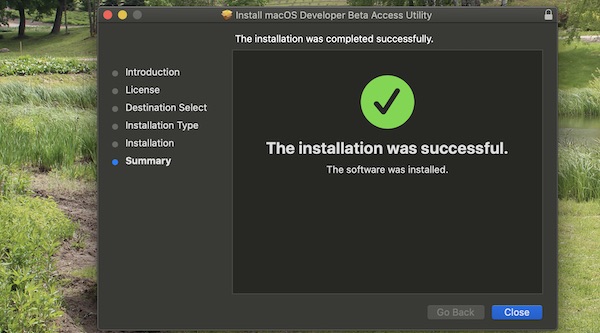
Step 2: Install it

Step 3: After that, you can download new macOS Big Sur 11.0 Beta via Torrent or Direct Download Link > here.
Important: all download and installation steps described in this article are performed at your own risk. This is the earliest beta build of the update, so don’t expect it to work perfectly. To avoid losing your personal data, we strongly recommend that you save a backup copy to be able to roll back.
Don’t forget that you can downgrade macOS Big Sur 11.0 to macOS Catalina 10.15. You can do it via macOS Catalina 10.15 download links.


0 Comments
Share your thoughts with other AppleBlog readers.