Skip to content
AppleBlog
Animoji

How To Create MEMOJI on iPhone X via iOS 12

Published by AppleBloggerUX in Animoji

Animoji

Here you can see How To Create MEMOJI on iPhone X via iOS 12. It's free simple guide for all who want create MEMOJI on their iPhone.Memoji will

Animoji 2018
Key details

Here you can see How To Create MEMOJI on iPhone X via iOS 12. It's free simple guide for all who want create MEMOJI

Apple Blog 2018

About this post

How To Create MEMOJI on iPhone X via iOS 12. Here you can see How To Create MEMOJI on iPhone X via iOS 12.

Apple Blog 2018

How To Create MEMOJI on iPhone X via iOS 12

“Here you can see How To Create MEMOJI on iPhone X via iOS 12. It's free simple guide for all who want create MEMOJI on their iPhone.”

Memoji will appear only in iOS 12. A new version of the operating system will be released in the fall of 2018. Until the official release, developers and members of the open beta program will be able to test the personal Animoji. The innovation will work on smartphones equipped with the Face ID system.

How To Create MEMOJI on iPhone X:

1. Open the “Messages”;

2. Click on the button Animoji – with the face of the monkey;

3. Click on “+”;

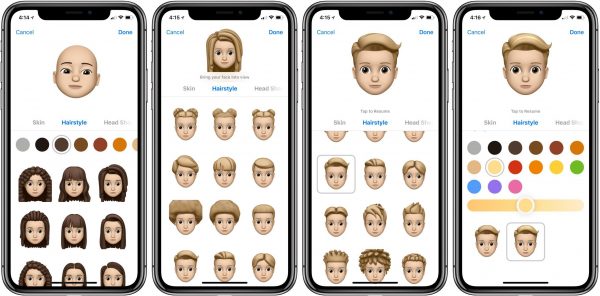
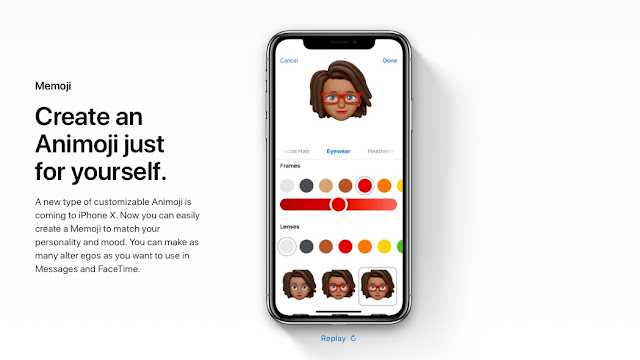
4. Start configuring a personal smiley;

5. Wait … and… click on the “Done” button.

The new Memoji will be saved in the library with the rest of the animated smileys.

In Memoji, you can adjust the skin color, gender of the character, hair color and hairstyle:

Share this post

Send this article to other Apple fans.

Previous Post

iOS 12 Supported Devices + Compatibility List

Next Post

Apple iPhone 9 Price in USA / US – ATT, Verizon, T-Mobile, Sprint

Discussion

0 Comments

Share your thoughts with other AppleBlog readers.

Leave a comment

Your email address will not be published. Required fields are marked with *.