Skip to content
AppleBlog
Backup iCloud

How To Backup iPhone To iCloud

Published by AppleBloggerUX in Backup iCloud

Backup iCloud

Here you can find complete guide How To Backup iPhone To iCloud on iOS 12, iOS 11, iOS 10.In this step-by-step instruction, I will talk in detail about

Backup iCloud 2019

Key details

Here you can find complete guide How To Backup iPhone To iCloud on iOS 12, iOS 11, iOS 10.In this step-by-step instruction, I will

Apple Blog 2019

About this post

How To Backup iPhone To iCloud. Here you can find complete guide How To Backup iPhone To iCloud on iOS 12, iOS 11, iOS

Apple Blog 2019

How To Backup iPhone To iCloud

“Here you can find complete guide How To Backup iPhone To iCloud on iOS 12, iOS 11, iOS 10.”

In this step-by-step instruction, I will talk in detail about how to backup iPhone in iCloud, where backup copies are stored, how to restore the phone from it, how to delete an unnecessary backup and some additional information that may be useful. Ways are also suitable for the iPad.

The iPhone backup contains almost all of your phone data, except for Apple Pay and Touch ID, data that is already synchronized with iCloud (photos, messages, contacts, notes), installed applications.

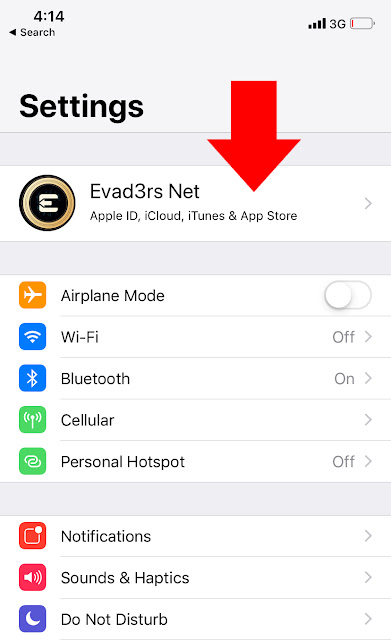
Step 1. Go to Settings and tapping on your name at the top of the screen.


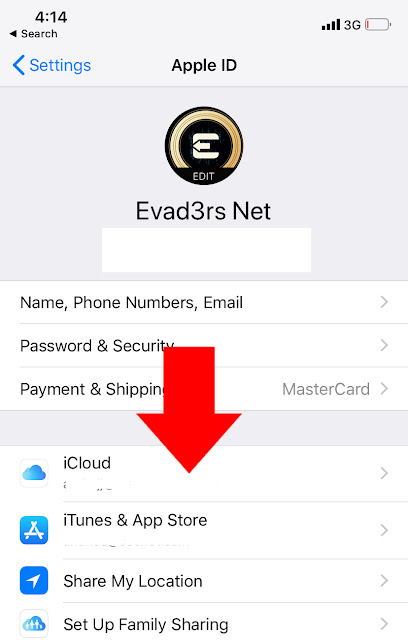
Step 2: Then, tap iCloud.

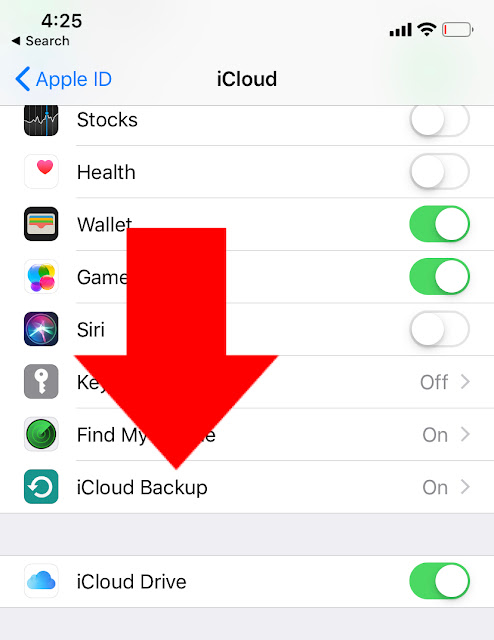
Step 3. Scroll down and tap on iCloud Backup. Make sure the switch next to iCloud Backup is turned on.

Step 4. Finally, tap Back Up Now.

You can use this backup after resetting to factory defaults or on a new iPhone: during the initial setup, instead of “Set up as a new iPhone”, select “Restore from iCloud copy”, enter your Apple ID data and perform a restore.

Share this post

Send this article to other Apple fans.

Previous Post

How to download music and video on iPhone 11, XS, XR, X

Next Post

macOS Catalina Review. From iPad to Mac. To be continued

Discussion

0 Comments

Share your thoughts with other AppleBlog readers.

Leave a comment

Your email address will not be published. Required fields are marked with *.