But there has always been one obvious limitation: the screen. Even the largest iPhone Pro Max is still a relatively narrow device. It’s excellent for messages, photography and everyday apps, but reading a long novel on it can sometimes feel like looking at a book through a small window.
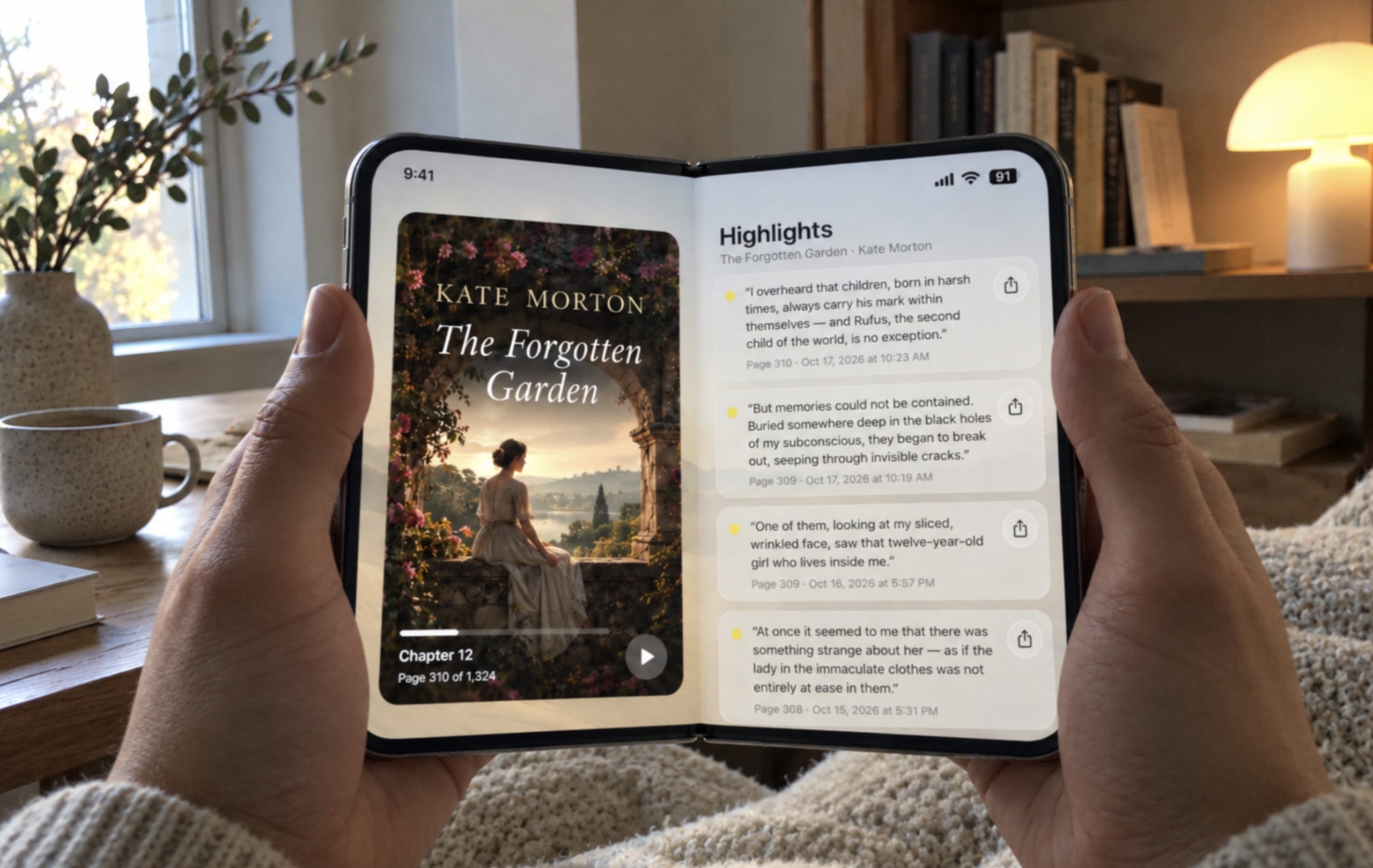
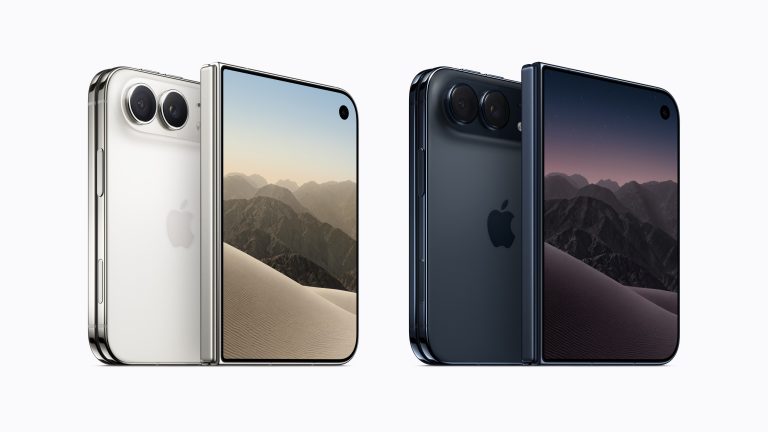
That’s why the idea of reading books on the new iPhone Duo is particularly interesting to me. A foldable iPhone isn’t just about having a larger display. It’s about carrying something that could feel like a phone when closed and a small book when opened.
And perhaps reading is one of the few activities where this new form factor could make an immediate, meaningful difference.
A Book in Your Pocket
The convenience of an iPhone with more room for reading when the device is unfolded.
EPUB and PDF Reading
Why a larger display could make personal digital libraries more enjoyable to use.
Books Pro
A reading app designed around personal books, now adapted for the iPhone Duo experience.
Why a Foldable iPhone Makes Sense for Reading
Most smartphone features don’t necessarily become better just because the screen gets bigger. Messages are still messages. Checking the weather doesn’t require a tablet-sized display. Even social media apps sometimes look strangely empty when stretched across a larger screen.
Books are different.
For centuries, we’ve been comfortable reading text across the pages of a book. The proportions are familiar. Our eyes understand the layout, and our hands know how to hold it. A foldable smartphone has the potential to bring some of that experience back into a device we already carry everywhere.
Imagine opening your iPhone Duo on a plane and continuing a novel on a spacious display. Or sitting in a café with a device that feels less like a smartphone and more like a compact digital book.
There’s something appealing about that simplicity. You don’t need to carry a separate tablet or e-reader. You just open the phone you already have.
The Difference Between Reading on an iPhone and iPhone Duo
Reading on a conventional iPhone is mostly a vertical experience. The text appears in a relatively narrow column, and you move through a book with frequent page turns or scrolling. It works well, particularly for short reading sessions, but the physical dimensions of the screen influence the entire experience.
An unfolded iPhone Duo offers the possibility of a different layout. Instead of simply making the letters larger, a properly adapted reading app can use the additional width to create more comfortable margins, better line lengths and a layout that feels closer to a physical book.
This distinction matters more than it might seem. A reading app should not simply stretch its existing interface to fill a larger display. The text itself needs to be presented differently.
And that brings us to the software.
Apple Books or a Dedicated Book Reader?
Apple Books is an excellent starting point for reading on an iPhone. It’s familiar, well integrated into Apple’s ecosystem and particularly convenient if you purchase your books through Apple’s bookstore.
But not everyone builds a digital library that way.
Some readers have been collecting EPUB files for years. Others keep books from different sources, personal documents or PDF editions that they want to organize themselves. For those people, a dedicated reader can sometimes feel more comfortable than an application built partly around a bookstore.
I’ve always preferred the idea of opening a reading app and immediately seeing my own books. Not recommendations, not a storefront, not another list of things to buy. Just the collection I’ve chosen to keep.
That preference was one of the reasons I started working on Books Pro, a personal reading app for iPhone and iPad. And with the arrival of the iPhone Duo form factor, adapting the app for a larger reading surface became an especially interesting part of its development.
Books Pro on iPhone Duo
Books Pro was created with a relatively simple philosophy: the book should always be more important than the application around it.
That sounds obvious, but it influences almost every design decision. The library should be easy to navigate. The interface shouldn’t compete with the text. And once you’ve started reading, there should be as little as possible between you and the story.
The latest Books Pro update includes adaptations for the iPhone Duo’s display format. Rather than approaching the device as just another large iPhone, the goal is to make better use of the space available for reading.
It’s an interesting challenge because a foldable device changes the relationship between portability and comfort. When closed, the phone remains something you carry in your pocket. When opened, it gives the reader more space without requiring a separate device.
I think this is where dedicated reading applications have an opportunity to stand out. A beautiful reading experience isn’t necessarily about having more controls or more complicated settings. Sometimes it’s about knowing when the interface should disappear.
Reading EPUB Books on a Foldable iPhone
EPUB is one of the most practical formats for digital books because its text can adapt to different display sizes. Unlike a fixed page image, an EPUB book can reflow its paragraphs according to the available space, font size and reading layout.
That makes it particularly well suited to a device such as the iPhone Duo.
On a conventional iPhone, an EPUB reader can arrange the text in a compact column. On a larger unfolded display, the same book can be presented with more breathing room and a different balance between text and margins.
Ideally, the transition should feel completely natural. You shouldn’t have to think about screen dimensions or formatting every time you open a book. The reader should take care of that.
For novels, biographies and other text-heavy books, this flexibility is one of the strongest reasons to prefer EPUB over fixed-layout documents.
What About PDF Books?
PDFs are a different story. A PDF usually preserves the original page layout, which is useful for documents, illustrated books, manuals and publications where formatting matters.
Unfortunately, that same quality makes PDFs less comfortable on small smartphone screens. Text can become tiny, and reading often involves zooming and moving around the page.
A larger foldable display could help considerably. More screen space means more of the original page can remain visible at a readable size.
It won’t magically solve every PDF formatting problem. A complex document designed for a large sheet of paper may still be more comfortable on an iPad or computer. But for many everyday documents and digital publications, an unfolded iPhone could be a welcome improvement.
Why Offline Reading Still Matters
One of the things I appreciate most about reading is that it doesn’t need to be connected to the rest of the world.
We spend so much time using applications that depend on notifications, servers, recommendations and a constant internet connection. A book is refreshingly different. Once it’s on your device, it can simply be there whenever you need it.
Books Pro supports offline reading for books already stored locally in the app. That means you can continue reading on a plane, during a train journey or anywhere with unreliable mobile coverage.
Apple Books also offers offline access to downloaded books, of course. This isn’t a reason to dismiss Apple’s application. It’s simply a reminder that offline availability should be a basic requirement of a good book reader, not a premium luxury.
And on a travel-friendly device like the iPhone Duo, it becomes even more important.
A Personal Library Should Look Personal
There’s something satisfying about seeing a collection of books you’ve built over time. Some titles remind you of a particular vacation. Others take you back to a different period of your life. Even the covers can become familiar in the same way that books on a physical shelf do.
One of the recent additions to Books Pro is the ability to upload your own book covers. I like this feature because digital books don’t always arrive with the artwork we remember, and some personal files don’t have a proper cover at all.
Being able to choose a cover makes the collection feel less like a folder of documents and more like an actual library.
It’s not the kind of feature that will transform the world of reading. But it makes a difference every time you open your collection, and sometimes those quiet improvements matter more than a long list of technical features.
Sharing Quotes From Books
Another Books Pro feature lets you share quotes as images.
I think almost everyone who reads regularly knows the feeling of finding a sentence that makes them stop. Perhaps it describes something you’ve experienced. Perhaps it’s a beautiful piece of writing. Or perhaps you simply want to share a thought with someone who might appreciate it.
Traditionally, you might take a screenshot, crop it and send it to a friend. Books Pro offers a more direct way to turn a quote into an image.
It’s a small addition, but one that fits naturally into the way people read today. Books remain a personal experience, yet occasionally we find a passage worth sharing.
Could the iPhone Duo Replace a Kindle?
This is probably the question many readers will ask, and I don’t think there’s a universal answer.
A dedicated e-reader still has real advantages. E Ink displays are designed for reading, often remain comfortable in bright sunlight and can deliver excellent battery life. A smartphone display, however advanced, doesn’t automatically replace those qualities.
But convenience is a powerful argument in the other direction.
If you already carry an iPhone Duo, you have your books with you without packing another device. You can read for ten minutes between meetings, continue on a flight or spend an evening with a novel without switching to something else.
For occasional readers, that may be enough. For people who read several hours every day, a dedicated e-reader may still make more sense.
I suspect the foldable iPhone won’t replace every Kindle. But it could make a separate e-reader unnecessary for quite a few people.
What I Really Want From a Foldable Book Reader
When I think about reading on a folding iPhone, I don’t immediately think about impressive animations or complicated interface tricks. I think about the small details that make reading comfortable.
Text should remain easy to follow. Margins should feel natural. The interface should adapt to the screen rather than simply fill it. Opening the device shouldn’t make reading more complicated, and returning to a book should be effortless.
I’d also love to see reading apps continue exploring more natural page layouts, especially on devices that physically resemble a small open book. There’s room for thoughtful software design here, and I think we’re only beginning to understand what makes sense on a folding display.
For Books Pro, that’s the direction I want to keep exploring: making the technology less noticeable and the reading experience more enjoyable.
For Novels
A spacious, adaptable reading layout that gives long passages room to breathe.
For Travel
Your downloaded books stay available even when there’s no internet connection.
For Your Library
Personal book collections, custom covers and a reading-first approach.
Is Books Pro Better Than Apple Books on iPhone Duo?
For my own reading habits, I prefer Books Pro. But I should be clear that I’m involved in developing it, so this is a personal perspective rather than an independent comparison.
Apple Books remains a very good application, especially if you buy books directly from Apple and enjoy the convenience of its ecosystem. There’s no reason to pretend otherwise.
Books Pro takes a different approach. It focuses on personal books, a simple library experience and an interface that doesn’t try to become a bookstore. Its adaptation for the iPhone Duo is an extension of that philosophy.
I don’t think the best reading application is necessarily the one with the most features. It’s the one that makes you want to keep reading.
And that’s what I’m trying to achieve with Books Pro.
The Future of Reading on iPhone
It’s interesting how technology sometimes brings us back to familiar ideas. We spent years making phones larger, thinner and more powerful. Now a folding display offers the possibility of something that resembles one of the oldest and most successful ways to organize information: a book.
Of course, a foldable iPhone won’t feel exactly like paper. It won’t smell like a bookstore, and it won’t replace the pleasure of turning a physical page. But it could make digital reading more comfortable without sacrificing the convenience of a smartphone.
That’s why I find the iPhone Duo particularly interesting. Not because the screen folds, but because opening it could change how naturally we read.
If you’re curious about Books Pro, you can find it on the App Store. The latest update includes adaptations for the iPhone Duo, custom book covers, quote sharing and other improvements.
And I’m curious about your opinion. Would you read more books on a foldable iPhone, or would you still prefer an iPad, Kindle or traditional paper book? Let me know in the comments. I suspect the most interesting uses for foldable phones won’t necessarily be the ones we see in their advertisements.
Frequently Asked Questions
Is the iPhone Duo good for reading books?
A foldable iPhone design could be particularly well suited to reading because the larger unfolded display offers more space for text, comfortable margins and adaptable layouts. The actual experience depends on the device and the reading app.
What is the best book reader for iPhone Duo?
Apple Books is a convenient option for people who purchase books through Apple’s ecosystem. Books Pro is an alternative focused on personal book collections and a reading-first interface, with adaptations for the iPhone Duo.
Can I read EPUB books on a foldable iPhone?
Yes, with a compatible EPUB reading app. EPUB is particularly suitable for different screen sizes because its text can adapt to the available display space.
Are PDF books easier to read on iPhone Duo?
A larger unfolded display can make PDF pages easier to view than on a narrow smartphone screen. However, complex documents with fixed layouts may still require zooming.
Can I read books offline with Books Pro?
Yes. Books stored locally in Books Pro can be read without an active internet connection.
Can Books Pro use custom book covers?
Yes. Books Pro includes the option to add your own book covers, allowing you to personalize the appearance of your digital library.
Can the iPhone Duo replace a Kindle?
For some readers, a foldable iPhone could reduce the need for a separate e-reader. However, dedicated E Ink devices still have advantages in battery life and display characteristics, particularly for long reading sessions.
Is Books Pro available for iPad too?
Yes. Books Pro is designed for both iPhone and iPad, offering a personal reading experience across Apple’s mobile devices.



0 Comments
Share your thoughts with other AppleBlog readers.