Jailbreak iOS 10.2 Download Yalu has been released. Today we can see this simple guide how to iOS 10.2 Jailbreak via Yalu + Cydia Impactor. It's only one
Downloads2017
Key details
Jailbreak iOS 10.2 Download Yalu has been released. Today we can see this simple guide how to iOS 10.2 Jailbreak via Yalu + Cydia
Apple Blog2017
About this post
JAILBREAK iOS 10.2 DOWNLOAD + YALU. Jailbreak iOS 10.2 Download Yalu has been released. Today we can see this simple guide how to iOS
Apple Blog2017
JAILBREAK iOS 10.2 DOWNLOAD + YALU
“Jailbreak iOS 10.2 Download Yalu has been released. Today we can see this simple guide how to iOS 10.2 Jailbreak via Yalu + Cydia Impactor. It's only one way to”
Owners of iPhone 7 and iPhone 7 Plus is to stay on iOS 10.1.1, since this is the only version that is compatible with Yalu exploit these devices.
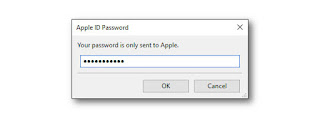
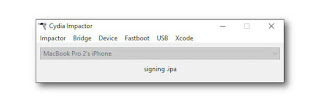
6) You will be asked to enter your Apple ID and password. This is only used to sign the IPA, letting it run on your device.
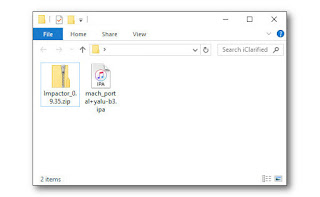
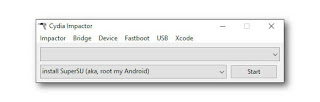
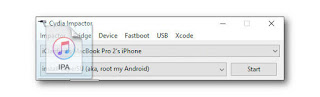
7) Cydia Impactor will sign the IPA and install the new Yalu jailbreak app (mach_portal) on your device.
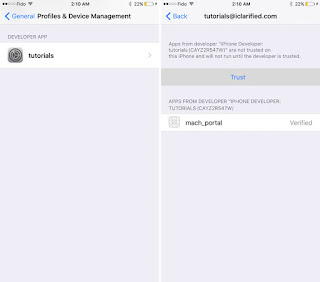
8) Once the app has successfully downloaded to your device you must trust the developer profile created under your email address.
Tap Settings, then General, then Device Management.
Select your email from the Device Management menu
Tap Trust (your email)
Click the Trust button from the popup that appears
Return to the Home screen and launch the Yalu (mach_portal) app.
!!! You’ll see a white screen displayed for about 15-20 seconds. <<<<<
Your iPhone will now reboot and you’ll have Cydia on your SpringBoard! Congratulations, you’re jailbroken!
After each restart you will need to relaunch yalu (mach_portal) as this is a semi-tethered jailbreak. After relaunching yalu (mach_portal), you’ll be able to launch Cydia and enjoy your jailbreak.
Done. It’s beta jailbreak, but it’s only one way to jailbreak iOS 10.2. This Jailbreak iOS 10.2 is semi-tethered.
Posted by:
AppleBloggerUX
in
Downloads
on
·
Updated




0 Comments
Share your thoughts with other AppleBlog readers.