SIGNAL 2 : View cell iPhone towers by city to find the best cell iPhone carrier
Published
by AppleBloggerUXin CELL IPHONE TOWERS
CELL IPHONE TOWERS
Signal 2 for iPhone 5, 4S, 4 View cell iPhone towers by city to find the best cell iPhone carrier on Apple Maps App.Signal 2 Features:1) it displays information
CELL IPHONE TOWERS2013
Key details
Signal 2 for iPhone 5, 4S, 4 View cell iPhone towers by city to find the best cell iPhone carrier on Apple Maps App.Signal 2
Apple Blog2013
About this post
SIGNAL 2 : View cell iPhone towers by city to find the best cell iPhone carrier. Signal 2 for iPhone 5, 4S, 4 View cell
Apple Blog2013
SIGNAL 2 : View cell iPhone towers by city to find the best cell iPhone carrier
“Signal 2 for iPhone 5, 4S, 4 View cell iPhone towers by city to find the best cell iPhone carrier on Apple Maps App.”
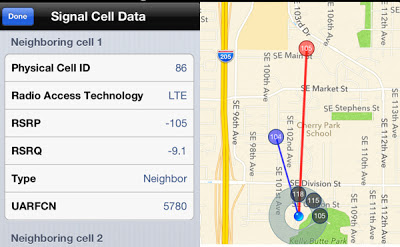
Signal 2 Features: 1) it displays information about the cell towers in your area. It shows the tower your iPhone is connected to, as well as other nearby sites, and displays them neatly on a map. 2) it offers up a range of technical data, including RSCP, which is signal strength, and Ec/N0, which is signal quality, to all of your local towers. It also shows the frequency at which each one is broadcasting.
0 Comments
Share your thoughts with other AppleBlog readers.