Skip to content
Apple Blog
Downloads

Top 10 Reasons Why You Should Install new ipadOS on iPad

Published by AppleBloggerUX in Downloads

Downloads

It's amazing ipadOS. Today, the annual conference of WWDC 2019 has started, in which Apple has traditionally demonstrated improvements in proprietary operating systems. Gathered all the most important

Downloads 2019

Key details

It's amazing ipadOS. Today, the annual conference of WWDC 2019 has started, in which Apple has traditionally demonstrated improvements in proprietary operating systems. Gathered

Apple Blog 2019

About this post

Top 10 Reasons Why You Should Install new ipadOS on iPad. It's amazing ipadOS. Today, the annual conference of WWDC 2019 has started, in

Apple Blog 2019

Top 10 Reasons Why You Should Install new ipadOS on iPad

“It's amazing ipadOS. Today, the annual conference of WWDC 2019 has started, in which Apple has traditionally demonstrated improvements in proprietary operating systems. Gathered all the most important thing about”

Top 10 Reasons Why You Should Install new ipadOS on iPad:

  • Apple first introduced the iPadOS – this is a separate version of iOS, designed for the iPad. Its main feature is improved multitasking.

  • The shell of the new iPadOS allows you to add convenient application widgets directly to the main screen.

  • New gestures allow you to quickly switch between multiple applications and drag them.

  • Also, using gestures, it has become easier to work with files. (For example, you can copy the file with a three-finger tweet and paste the file with your fingers.)

  • iPadOS has an improved Files app in which content can be viewed as columns. In addition, there is full support for external drives.

  • Safari browser has become “more desktop”. He received a separate download manager and support for the masses of various keyboard shortcuts for working with web pages and files.

  • The delay with the Apple Pencil has been reduced from 20 ms to 9.

  • Swipe the stylus on the screen, you can make a screenshot, including a long one, immediately adding notes and captions to it.

  • The on-screen keyboard can be reduced with a single gesture and drag to the right place.

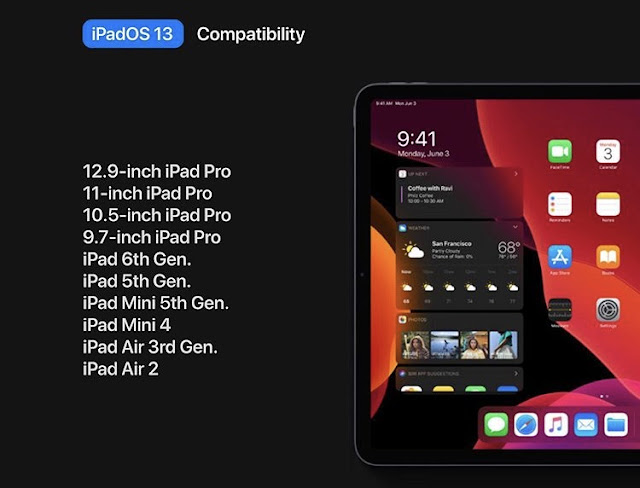
In it we found a lot of innovations that we did not see and did not anticipate. If your iPad Pro, iPad Air or iPad Mini are included in the list of supported by this iPadOS, we strongly recommend getting ready for a completely new lifestyle (ipadOS download links)

Share this post

Send this article to other Apple fans.

Previous Post

How to Use “Login With Apple” / “Sign in with Apple” on Apps or Website

Next Post

iOS 13 Beta Profile Download Links, Updates

Discussion

0 Comments

Share your thoughts with other AppleBlog readers.

Leave a comment

Your email address will not be published. Required fields are marked with *.