Skip to content
Apple Blog
Antivirus for Mac

Antivirus for Mac – Check your macOS Mojave for viruses

Published by AppleBloggerUX in Antivirus for Mac

Antivirus for Mac

Here is Antivirus for Mac. Contrary to popular belief, Mac computers can also be infected with malware. There are a number of programs for checking Mac for malware.

Antivirus for Mac 2019

Key details

Here is Antivirus for Mac. Contrary to popular belief, Mac computers can also be infected with malware. There are a number of programs for

Apple Blog 2019

About this post

Antivirus for Mac – Check your macOS Mojave for viruses. Here is Antivirus for Mac. Contrary to popular belief, Mac computers can also be

Apple Blog 2019

Antivirus for Mac – Check your macOS Mojave for viruses

“Here is Antivirus for Mac. Contrary to popular belief, Mac computers can also be infected with malware. There are a number of programs for checking Mac for malware. Here you”

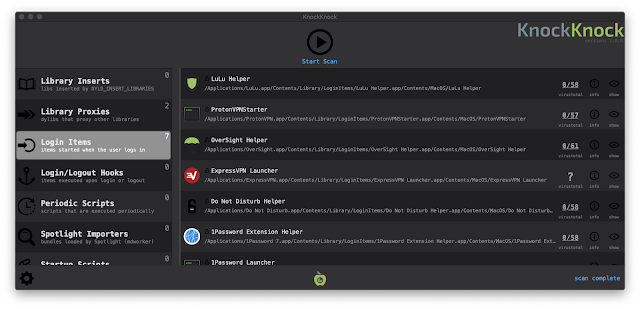
It’s KnockKnock:


This is a free application that not only shows what runs on your Mac, but also scans applications using the VirusTotal service, which scans files for viruses.

  • Launch KnockKnock and click on the “Start scan” option. The check will take about 1-2 minutes.

  • After its completion, the screen will display the results in several sections. For example, in the “Launch Items” section all applications will be assembled that automatically run on Mac.

  • The Kernel Extensions category displays a list of modules that may have been loaded into the kernel. Selecting a category will display information on the right with VirusTotal.

  • If any “startup item” is infected, you can click “Show” to find the file in Finder and delete it.


KnockKock will also help determine whether a particular application is released – Apple or a third party. Next to the element is the image of the castle. Closed locks in green indicate that the item is signed by Apple. Next to applications signed by third-party companies, is a closed black lock. Next to unsigned applications is an open orange lock. Open locks do not necessarily indicate that the application is infected, but such programs are still worth beingware.

Use KnockKnock to detect malicious items and immediately remove infected applications. Then configure autorun for useful applications and get rid of programs that start automatically.

KnockKnock [link]

Share this post

Send this article to other Apple fans.

Previous Post

How to add (remove) programs for automatic launch when macOS is loaded

Next Post

Refurbished iPhone Xs, iPhone Xr, iPhone X Models

Discussion

0 Comments

Share your thoughts with other AppleBlog readers.

Leave a comment

Your email address will not be published. Required fields are marked with *.