UPDATE: Now available for sale on M.I.C. store! While stocks last!
It is super cool to see the inner workings and hidden guts of the iPhone 4. With the transparent back panel, I exchanged with the original glass panel and my iPhone turns into transparent without the need of using paint thinner on the actual iPhone 4 back.

The transparent back panel I got here is silver in color, while there are two more colors — black and white.

I wish the Apple logo is not there…

You need to unscrew the two little screws on the bottom before you can exchange the back panel. For some users, the bottom screws may be star-shaped, so you need to get a special screwdriver for that. I got both types of screwdrivers when I purchased this back panel, so no worries for me.

This is how you exchange the back panel.
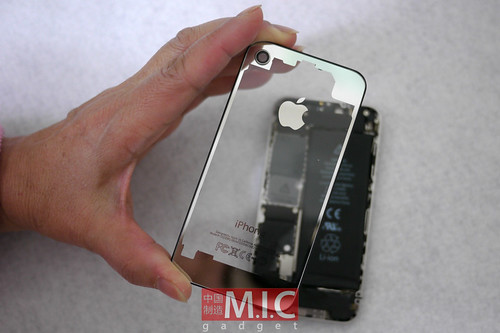
It is super clear!

Is this thing legal? We’re not sure.


Looking at the back…

Close-up on the camera part.

And the two little holes for the bottom screws.
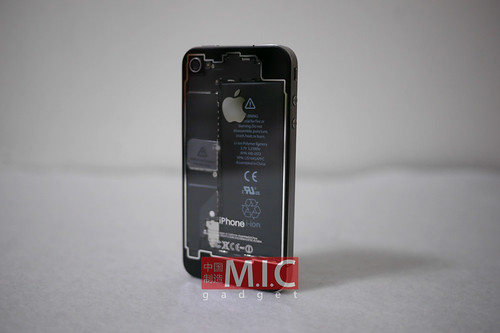
Here are the two other colors!

While we are admiring the clear, see-through casing, we found a problem. You may heard of the problems of light leakage with a white iPhone 4, and the problem does exist on this clear back panel. There are users reporting that with a white back, the camera flash can become unusable. We heard that, and we decided to test it out. Below is what we got with flash on.
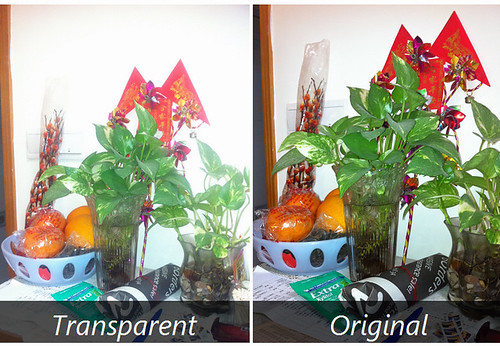
As you can see, photos with flash look better on the original black panel than the transparent one. Below is what we got without flash.

It is weird to see that the photo taken on the transparent iPhone looks milky. So, this tells us that the photo quality will be bad with this transparent back panel. Oh my…

This is how my iPhone looks like in the dark. Seems pretty cool to me. Some of my friends think it looks ugly. Well, what do you think?
P.S. If you are interested to purchase this transparent back panel, feel free to look for us on Twitter! Available for purchase right here! [M.I.C. store] (SOLD)



0 Comments
Share your thoughts with other AppleBlog readers.