Skip to content
Apple Blog
How To

How To Hard Reset iPhone 11, iPhone X

Published by AppleBloggerUX in How To

How To Hard Reset iPhone 11, iPhone

Step 1: Press and hold the Volume Up button..Step 2: Press and quickly release the Volume Down button.Step 3: Now press and hold the

How To 2019
How To

How To Hard Reset iPhone 11, iPhone X. We know that Apple released their new iPhone X with new features and without Home Button. Sometimes we has problems

Apple Blog 2019

Key details

How To Hard Reset iPhone 11, iPhone X. We know that Apple released their new iPhone X with new features and without Home Button.

Apple Blog 2019

How To Hard Reset iPhone 11, iPhone X

“How To Hard Reset iPhone 11, iPhone X. We know that Apple released their new iPhone X with new features and without Home Button. Sometimes we has problems and errors”


Today you can see out simple guide for all who has new iPhone X. Ok. Let’s go.

How To Hard Reset iPhone 11, iPhone X:

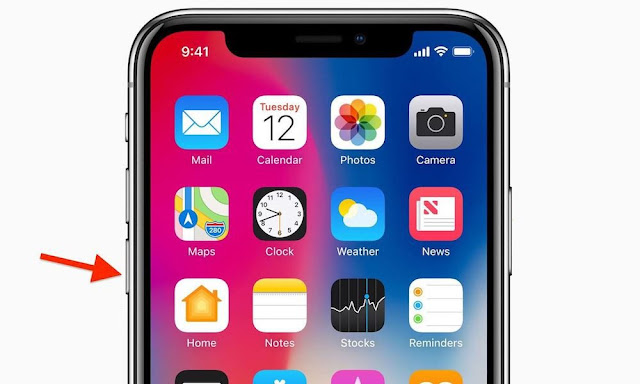
Step 1: Press and hold the Volume Up button..

Step 2: Press and quickly release the Volume Down button.

Step 3: Now press and hold the Side button until your device restarts and the Apple logo appears.

Step 4: Wait for a couple more seconds until your iPhone boots up to the Lock screen. At this point, the hard reset should be complete.


This is simple guide how you can hard reset your iPhone X using the Side button
and Volume down button. Once your device boots up to the Lock screen,
you should be able to use it normally and all of your data will remain
intact.

Now that you’ve learned this method, it should be quite
easy for you to perform a hard reset in the future. This new method of
hard resetting your iPhone X is quite similar to that of iPhone 8 and
iPhone 8 Plus.

Share this post

Send this article to other Apple fans.

Previous Post

How To Record a Phone Call on iPhone 11, Xs, Xr, X

Next Post

How to change the password on the iPhone 11, XS, XR, X

Discussion

0 Comments

Share your thoughts with other AppleBlog readers.

Leave a comment

Your email address will not be published. Required fields are marked with *.

