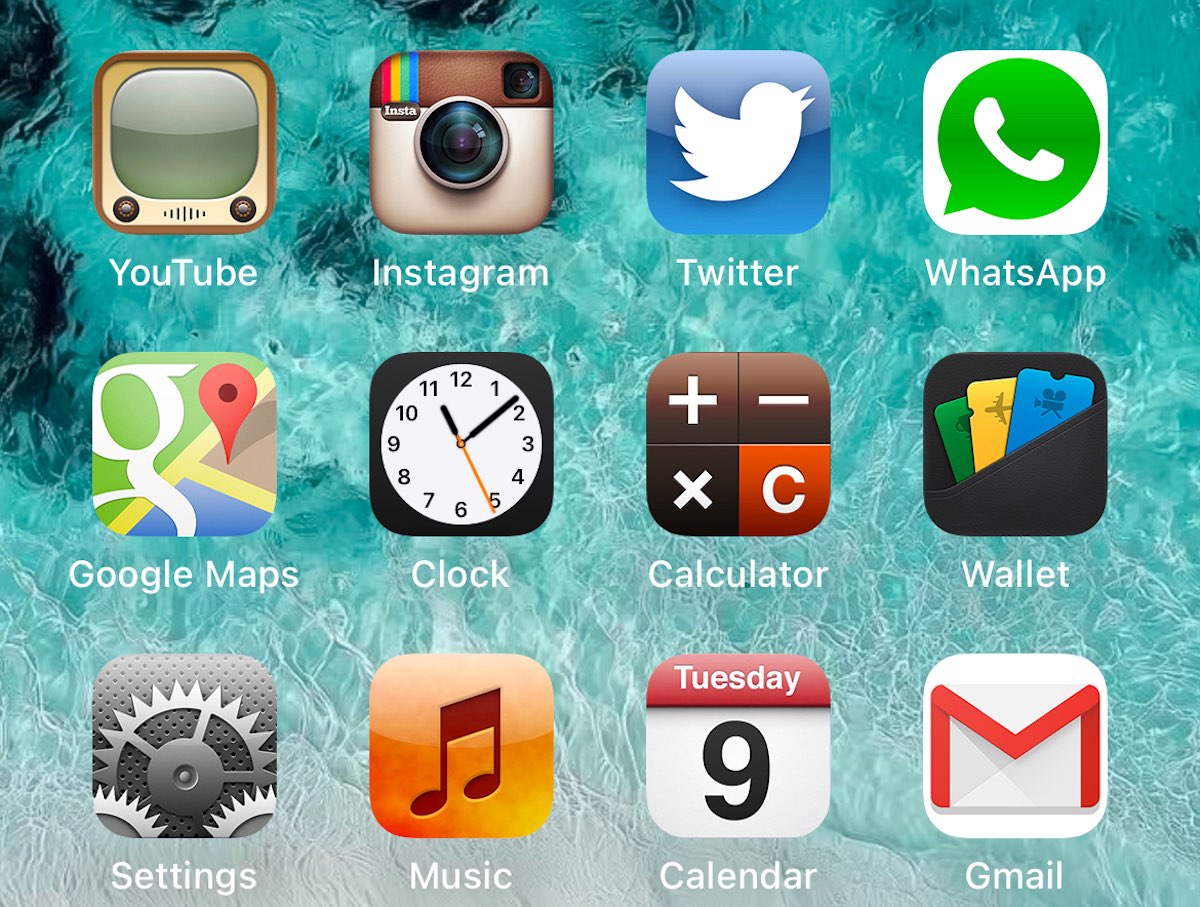
Many Apple users miss this timeless aesthetic, renowned for its clean simplicity and ease of use. Thankfully, you can now effortlessly bring back the iconic iOS 6 design to your latest devices, including the brand-new iPhone 16 Plus, running the very latest iOS 26 and iPadOS 26.
Why Choose the iOS 6 Icon Design on new iOS 26 or “old: iOS 18?
iOS 6 icons represent a pivotal moment in Apple’s design philosophy, emphasizing clarity, functionality, and visual harmony. Steve Jobs championed designs that anyone could intuitively navigate, and these icons capture that essence perfectly. Returning to these icons isn’t just about nostalgia—it’s about reclaiming an era when simplicity and usability were paramount.
Simple, Safe, and Quick Installation
At Appleblog.org, we’ve made the installation process straightforward, quick, and secure. For over a decade, we’ve been providing Apple enthusiasts with safe, reliable profiles free from hidden files or malicious elements. Our trusted community ensures that every download is completely transparent and secure.
How to Install the iOS 6 Icons on iOS 26 and iOS 18:
- Visit our secure download page at Appleblog.org [link].
- Download the verified profile directly to your device.
- Follow the simple on-screen instructions to install the profile.
- Enjoy your refreshed, authentic iOS 6 experience on iOS 26!
Mix and Match for a Personalized Experience
Not ready to commit entirely to the classic look? No worries! Our profiles allow you to mix your beloved modern icons with the classic iOS 6 designs, offering flexibility and personalization at your fingertips.
Easily Reversible
Concerned about trying it out? Relax! Our process is fully reversible. If you ever want to revert to your original icons, you can easily delete the profile from your device’s settings—no technical hassle involved.
Trusted by Thousands
With over 10 years of expertise, Appleblog.org stands as a trusted resource in the Apple community. Thousands of satisfied users have seamlessly personalized their Apple devices with our authentic, safe, and intuitive profiles.
Revisit the timeless elegance of iOS 6 today – exclusively with Appleblog.org!




0 Comments
Share your thoughts with other AppleBlog readers.