Cydia iOS 7
Jailbreak iOS 9 is hobby, not a business (Jailbreak iOS 9.2 also)!!! This does not mean that everything what you want install in Cydia Store - only for
Jailbreak iOS 9 is hobby, not a business (Jailbreak iOS 9.2 also)!!! This does not mean that everything what you want install in Cydia
iOS 9 Cydia – How To Buy Cydia Tweaks / Buy iPhone Apps From Cydia Store. Jailbreak iOS 9 is hobby, not a business

Before you can begin you must have jailbroken your iPhone. You can find instructions on how to do that for your device. How To Jailbreak iOS 9, Jailbreak iOS 7!!!
Ok. Let’s Go Jailbreak Community:
Step 1: Lauch “Cydia”
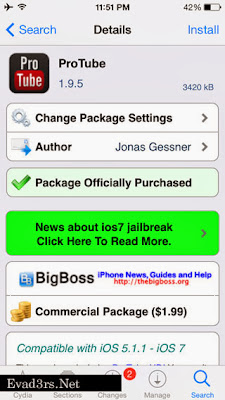
Step 2: Search Cydia App (Tweak), what you want to buy now. (Example “ProTube”)

Step 3: Select this Cydia App (Tweak)
Step 4: Click “Purchase”

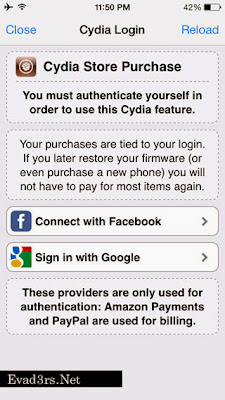
Step 5: You will be asked to login using your Facebook or GooglePlus account. We like Facebook!!!

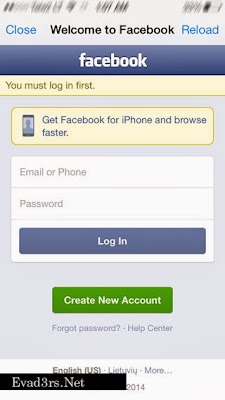
Step 6: Enter your Facebook login + password > Connect.

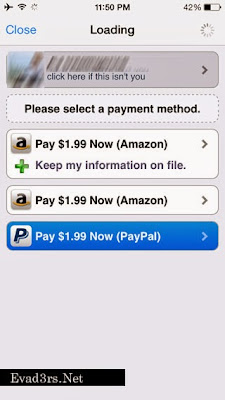
Step 7: Select Payment method “Amazon” or “PayPal”

Step 8: Enter your Paypalmail + Password > Pay Now

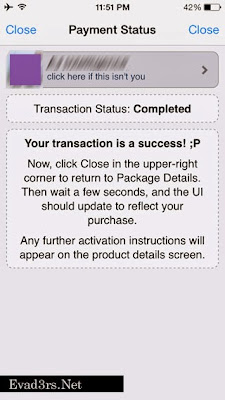
Step 9: You will now see a “Transaction Status: Completed”
Step 10: Press the “Close” button at the top right of the screen to continue.
Step 11: You can install Cydia App (Tweak).